
I spent last weekend doing something entirely new for me: vibe coding. You've likely heard this term all over the place now, where you guide AI tools like Claude Code or GitHub Copilot to do the bulk of the work of writing code. You just serve it instructions on what to do. If you're successful with it, you'll end up with a workable version of whatever app idea you had in your head in hours or days, instead of weeks or months.
It was my very first time letting AI take the reins from my hands to handle my software development. While I've been using these tools to help with smaller tasks like debugging or helping me clarify some gaps in my thinking, I've been very hesitant to give it as much control as I did this weekend. I'm not particularly against these tools, but I think it's more because after 20+ years of hands-on experience building software, it feels really strange to give up that kind of control.
Still, I wanted to give it a fair shot instead of turning into a version of the "old man yells at cloud" meme, so I decided to dedicate a couple of days to the process, using Claude Code as my vibe coding tool of choice. In some areas, the experiment went well enough. I got a mostly functional prototype of my idea done in hours instead of days, and Claude Code even offered some helpful suggestions that I hadn’t thought about.
At the same time, I couldn't help but feel like I was actually doing significantly more work compared to doing things on my own. I spent an enormous amount of time reviewing the generated code and asking Claude to redo areas that were over-engineered or didn’t fit with the rest of the changes made. I didn't realize I would have to spend so much time explaining what I wanted differently. There were also plenty of spots where I simply did the work myself since it would be faster than trying to explain things. It left me feeling uneasy about the whole experience.
Am I So Out Of Touch?
There's a lot of chatter on Reddit, X, and other social media platforms from people saying how they have been able to build and launch so many products by vibe coding. Some companies are even requiring their employees to use these tools in their daily work. I began to doubt myself after seeing these posts following my attempts with Claude Code. Was I doing something wrong and simply didn't know how to leverage AI to do this kind of work? As with most social media posts, survivorship bias comes into play, and I wonder how truly effective these developers are in the long term.
I’ve also seen vibe coding experiences in line with mine. A recent example comes from Adam Wathan, the creator of the Tailwind CSS framework. In a recent email newsletter, Adam wrote he and his team decided to use Claude Code to implement dark mode to hundreds of their Tailwind Plus components. Between fixing the inconsistencies that the tool submitted and polishing up the work done, Adam estimates that it took twice as long as if he had done the work himself without AI. Although he says the result turned out well, it sounds like he was ready to move on from the experience.
The disconnect between people who apparently know how to bend these coding agents to their will and people like me who can’t felt strange, and I wondered if I was simply using these tools incorrectly. Eventually, I realized that there is no right or wrong when it comes to using AI for our work. Everything in software development consists of trade-offs. AI is no exception to that rule. Using Claude Code for the bulk of my development this past weekend was a massive trade-off, and one that I think most people who are all in with AI—especially newer developers—don't even realize they're making.
Trade-Offs, Trade-Offs Everywhere
You've probably seen or heard about the project management triangle, where the vertices give you the options of making your project good, fast, and cheap, but you can only pick two at any given time:
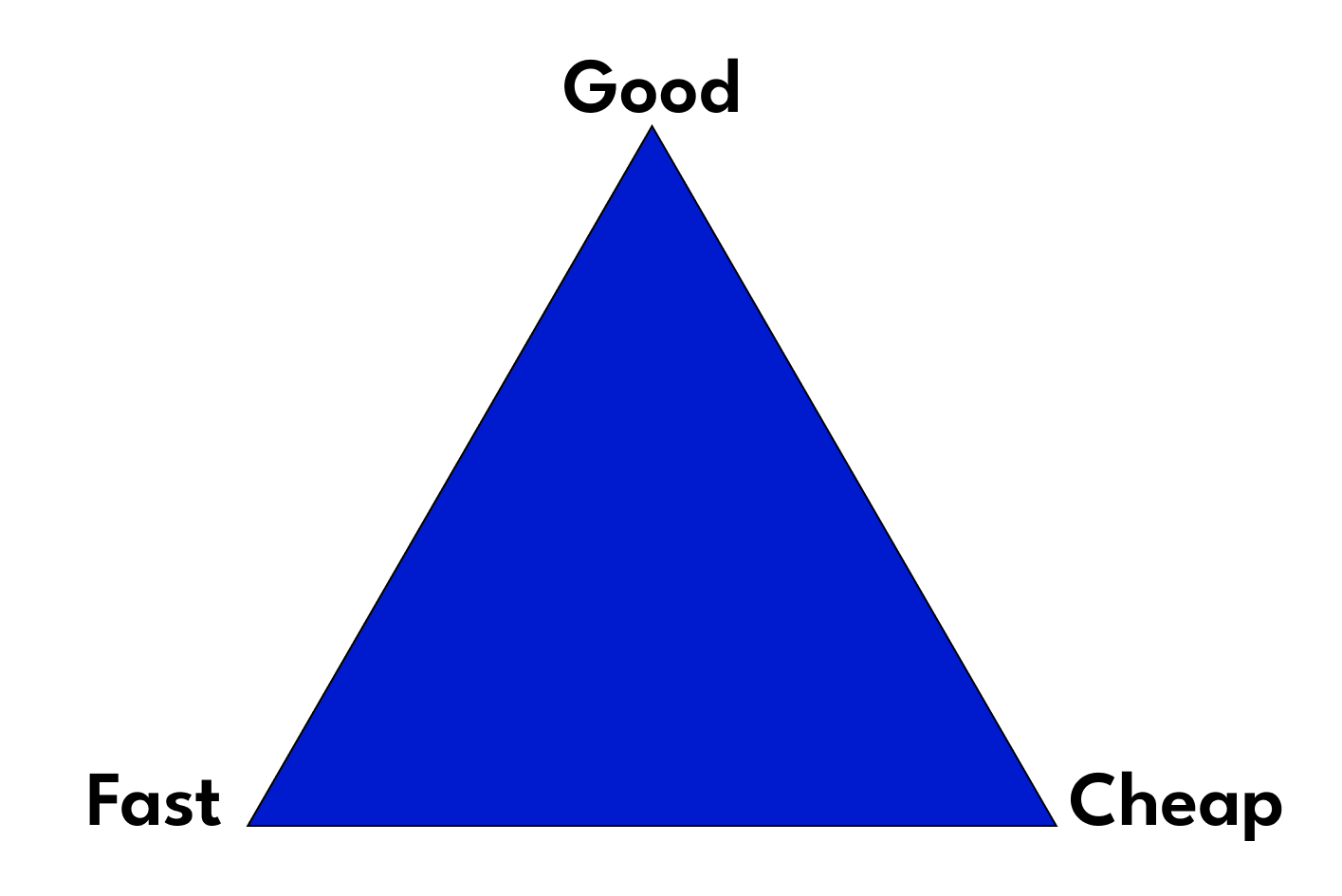
Throughout my career, I have seen firsthand that this triangle applies to every single project I've worked on. Personally, I've never worked on any piece of software that was built faster than expected, under budget, and worked with few defects out of the box. I've spent my career in "Startup Land" and we often had to nail the "fast" part of the triangle but completely fell apart in the "good" or "cheap" segments. In some cases, the "fast" choice was the only one we were able to accomplish.
Going back to my experiment, vibe coding hit the fast and cheap spots of the project management triangle by getting something up and running quickly with a Claude subscription that costs $20 a month. However, it flunked the “good” segment of the triangle. One of the reasons why I was left with an uneasy feeling after my vibe coding session was because I was subconsciously expecting to nail the trifecta of the project management triangle. Had I gone in with the realization that using AI to build my app was a big trade-off I had to be willing to make, trading in quality over cost and speed, my experience would have probably been a bit more positive.
These trade-offs are ones that I feel most software developers aren’t aware of. These days, most people only focus on speed, and that’s where LLMs shine. It’s so easy to get sucked into using these tools and get your code written in a fraction of the time it probably took you to come up with prompts. But I can almost guarantee that those gains came with low-quality output and a decent chance that it’ll end up costing you more eventually.
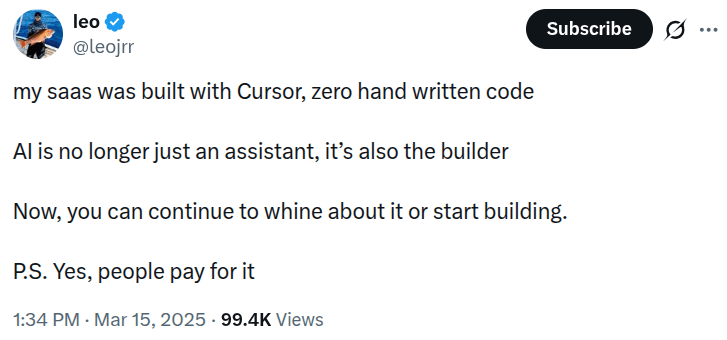
We've seen the effect of using AI without fully understanding the trade-offs happen in the wild. A few months ago on X, someone proudly boasted how the Cursor code editor built their product without them writing any code:
A few days later, they followed up on their app:
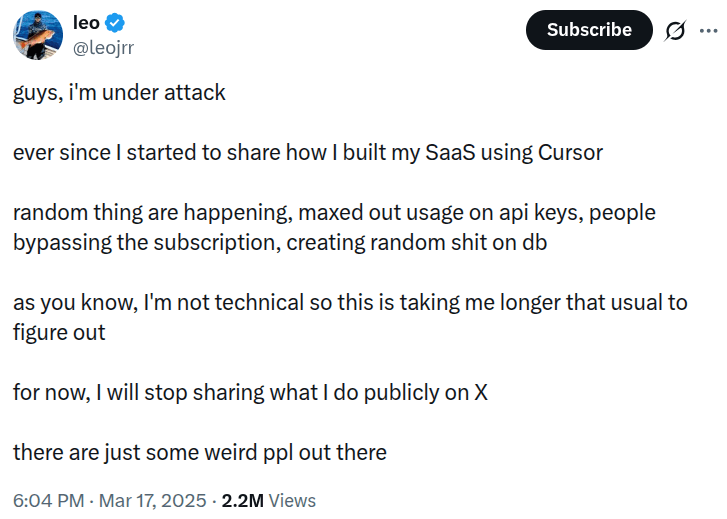
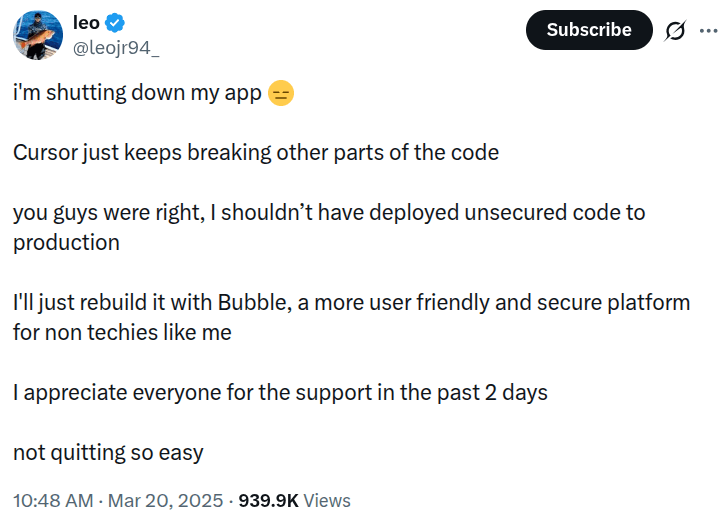
This scenario is likely an extreme case of the dark side of vibe coding, and it’s not an indictment of using Cursor, Claude Code, or any other similar tool. I’m sure there are also plenty of success stories that we don’t hear about. But it’s not uncommon to see AI-generated code create all sorts of chaos if we’re not cognizant of the trade-offs.
Trade-Offs in the Real World
Vibe coding is just one of many places where trade-offs need to be made by software developers and testers in their daily work. My experience with vibe coding is only one example that demonstrates this. In the past couple of weeks, I’ve had to make many, many trade-offs when working with others.
Trade-offs in software testing
In a recent consulting gig, a client mentioned that their workflow included plenty of automated testing, yet they still had some struggles with bugs sneaking into production. It turns out their team relied solely on the automated tests, with the barest of manual testing before deploys. My recommendation was to make time for manual, exploratory tests throughout their sprints. The client hesitated, claiming it would slow them down significantly.
I pointed out the trade-offs of both methods: automation adds speed at the expense of catching bugs, while exploratory testing sacrifices speed to focus on catching new bugs and edge cases. It turned out that the client’s QA team had been nearly begging for more manual testing time for a while. After realizing the trade-offs and some early experiments, the client was able to see the benefits of this approach with fewer noticeable bugs after deployments.
Automated testing makes sure that existing functionality continues to work as the codebase grows and evolves, but the trade-off is that it will rarely uncover new and unexpected bugs. You might discover a new bug when an automated test fails, but that's usually more luck than intention. Manual testing will let us locate the issues that automation can't, from unexpected errors to edge cases to usability issues, albeit requiring more time and people on the job. These two software testing methods are the key to quality, and knowing the trade-offs of each will help you get the most out of your QA.
Trade-offs in software architecture
The work of planning the architecture around a software application is essentially all about dealing with trade-offs. Almost every decision a software architect or engineer makes consists of making the conscious choice to go with one thing, knowing that it comes at the potential expense of another. Often, the coding part of building software isn’t the hard part, but knowing how to build software for the long haul is.
When starting a new software project, the early decisions you make will test the limits of the project management triangle. For example, you can spend money and time on setting up high availability with automated failover mechanisms and load balancing or keep costs low and deploy quickly on a single server. Or you can build the application using microservices to help future scaling or a monolith that reduces the communication overhead between people and systems.
These examples aren't mutually exclusive, and development teams can work on handling both sides of each focus. For example, we can plan for having high availability but start off with a single instance of our application servers. But in my experience, you will never achieve a perfect balance when it comes to designing software, and there's always one side that will come up short. It's a matter of knowing that up front and taking measures to minimize potential issues to keep the systems up and running.
Trade-offs in software deployment
Another area full of trade-offs is application deployment. You might think deploying software doesn’t require much thought and that all you need is to push code updates to your production infrastructure. But before you reach that point, teams need to think through how those updates get shipped. We have different strategies to update our applications when they’re in production, and each option works best for different situations:
The easiest way to deploy an app is the “all at once” method, where you push updates to all servers. It’s the fastest way to update, but it increases the risk of failure and may require downtime for more complex environments. You can mitigate the “all at once” shortcomings with other deployment methods. For instance, rolling deployments update servers gradually to avoid downtime but require us to manage traffic routing to prevent inconsistencies between old and new versions of the app. Blue-green deployments use separate environments for safe testing and easy version switching, at the cost of duplicate infrastructure.
You can dig even deeper and explore other deployment methods: canary deployments that expose changes to a subset of users (gathers real-world feedback before shipping new functionality to everyone but requires a significant investment in monitoring changes), feature flags that allow developers to toggle features independently of deployments (helpful for A/B testing, at the expense of added complexity and tech debt in the codebase). Like everything else explained in this article, there's no perfect deployment approach. Each strategy makes conscious trade-offs between speed, safety, cost, and complexity.
Wrap Up
There’s never a “one size fits all” solution to software development. All we have are making deliberate and intentional choices about what matters in the moment. Developers who are all in with vibe coding and the ones like me who are far less optimistic about this paradigm are both right. The difference is that each group operates under different constraints. One group is fine with the cheap and easy route, while the other prefers a high-quality experience.
There are no wrong answers, as long as you have an understanding of what you’re giving up in order to gain something else in return. The problems start when you don’t realize what you’re giving up in return for prioritizing something else. Every choice you make is a long-term bet on what you’re willing to sacrifice, so make those choices deliberately.